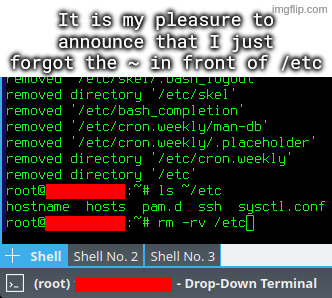
I accidentally untarred archive intended to be extracted in root directory, which among others included some files for /etc directory.
I went on to rm -rv ~/etc, but I quickly typed rm -rv /etc instead, and hit enter, while using a root account.
Reusing names of critical system directories in subdirectories in your home dir.

I agree with this take, don’t wanna blame the victim but there’s a lesson to be learned.
except if you read the accompanying text they already stated the issue by accidentally unpacking an archive to their user directory that was intended for the root directory. that’s how they got an etc dir in their user directory in the first place
Could make one archive intended to be unpacked from /etc/ and one archive that’s intended to be unpacked from /home/Alice/ , that way they wouldn’t need to be root for the user bit, and there would never be an etc directory to delete. And if they run tar test (t) and pwd first, they could check the intended actions were correct before running the full tar. Some tools can be dangerous, so the user should be aware, and have safety measures.
they acquired a tar package from somewhere else. the instructions said to extract it to the root directory (because of its file structure). they accidentally extracted it to their home dir
that is how this happened. not anything like what you were saying
I dunno, ~/bin is a fairly common thing in my experience, not that it ends up containing many actual binaries. (The system started it, miss, honest. A quarter of the things in my system’s /bin are text based.)
~/etc is seriously weird though. Never seen that before. On Debians, most of the user copies of things in /etc usually end up under ~/.local/ or at ~/.filenamehere
I think the home directory version of etc is ~/.config as per xdg.
It should be ~/.local/bin
~/bin is the old-school location from before .local became a thing, and some of us have stuck to that ancient habit.
Reminds me in the t-shirt: “don’t drink and root”
OOOOOOOOOOOF!!
One trick I use, because I’m SUPER paranoid about this, is to mv things I intend to delete to /tmp, or make /tmp/trash or something.
That way, I can move it back if I have a “WHAT HAVE I DONE!?” moment, or it just deletes itself upon reboot.
Just get a cli trash tool and alias it to rm. Arch wiki
That’s certainly something you can do! I would personally follow the recommendation against aliasing rm though, either just using the trash tool’s auto complete or a different alias altogether.
Reason being as someone mentioned below: You don’t want to give yourself a false sense of security or complacency with such a dangerous command, especially if you use multiple systems.
I liken it to someone starting to handle weapons more carelessly because the one they have at home is “never loaded.” Better safe than sorry.
Lol we should have “rules of rm safety”:
- Assume rm is always sudo unless proven otherwise.
- (EDIT)Finger should be off the Enter key until you are certain you are ready to delete.
- Never point rm at something you aren’t willing to permanently destroy.
- Always be aware of your target directory, and what is recursively behind it!
I think this is the best approach. I’ve created a short alias for my trash tool and also aliased
rmto do nothing except print a warning. This way you train yourself to avoid using it. And if I really need it for some reason I can just type\rm.If you want to train yourself even more effectively you can also alias
rmto runslinstead :)you can also alias
rmto runslinstead :)Choo-choo!!
Hehe I just thought of a hilariously nefarious prank: alias ls to sl. 😂
This need’s to be higher in the comments!
Also stealing this. What an awesome tip
HAH rookie, I once forgot the . before the ./
o.7
Nvidia once did it in their install script
it could be worse:
rm -rv ~ /etcI fucking hate using
rmfor these very reasons.There’s another program called “trash-cli” that gives you a
trashcommand instead of going straight to deletion.I’m not sure why more distros don’t include it by default, or why more tutorials don’t mention it.
Oof. I always type the whole path just because I have made this mistake before.
So good to see that, even in 2026, Unix Haters’ Handbook’s part on rm is still valid. See page 59 of the pdf
The handbook has numbered pages, so why use “page X of the pdf”? I don’t see the page count in my mobile browser - you made me do math.
(I think it’s page number 22 btw, for anyone else wondering)
I dont know if you use firefox on your phone, but i do, and i fucking hate it that i cant jump to a page or see the page number im on.
Mjpdf is decent, while still zen.
Next time:
ls ~/etc rm -rv !$Or press
alt+.to paste final argument of previous command
DId you try CRTL-Z?
instructions on clear, switched to vi mode in bash and cant exit