
The image looks surprisingly happy at that news
Microslop gonna Microslop
Windows printing is already a mess and a pain. Look to pre Windows 7, an easy standard print dialog.
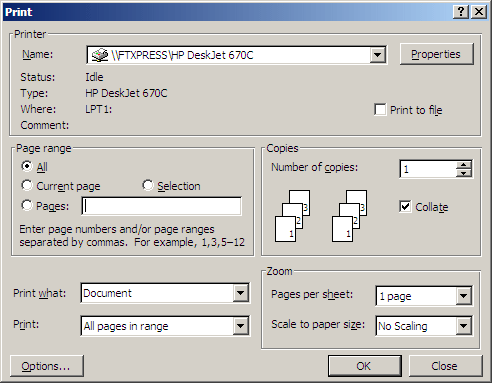
Ah. I miss that good ui. Such a good ui. There’s a reason it’s still around on all the utility backend and admin stuffs.
A dialogue box where it’s obvious what you can click on, all the information you need is clearly displayed, and all the keyboard shortcuts are visible? Some UX designer at Microsoft will be having a fit. Better convert that all to React and hide most of it behind a hamburger menu at once; this isn’t how things are done in Windows any more.
I still miss the XP Control Panel. We didn’t know how good we had it
… and last but not least, a dialogbox where everything works and the print actually get printed when you click print. Yup, not the MS way anymore
Since the page and the article have multiple dark patterns, here’s the meat of the story:
Microsoft is changing the way it handles printer manufacturer drivers in Windows 11, which could affect people using very old printers. But you can get around it.
The tech giant is phasing out support for older, legacy printer drivers, known as v3 and v4 drivers. While the move will likely affect only a small number of owners, it’s worth checking whether you’ll be affected.
Got an older printer? Here’s what you can do
If you have problems, you can still download the correct driver directly from the printer manufacturer’s website. Go to the official website of your printer’s manufacturer and search for your model in the Support or Drivers section.
It’s worth noting that after a fresh Windows 11 installation, or when setting up a new user profile, Windows may install a generic printer driver instead of the manufacturer’s own version. Basic printing should still work, but some features such as scanning might be missing. All you need to do is go to your printer manufacturer’s website and download the correct driver from there.
Beware of dodgy drivers
At Which? Tech Support, we’ve seen an increase in people being charged for drivers. You should never pay for a driver as they are free from the manufacturer. Always go directly to your manufacturer’s website so you’re not at risk of this.
Changes to printer drivers can cause some confusion, and scammers often take advantage of that. For example, watch out for any pop-ups that claim you have a ‘driver error’ and ask you to call a phone number – this is a common scam technique.
For peace of mind, use the official support pages for these major brands:
Microbloat is deprecating something? That’s new. Do AI next.
It’s hard to hear what Microsoft is saying over the sound of my 15 year-old printers running on CUPS.
Just a heads up some of those old drivers are just encapsulated perl scripts with root access. Easy network target for bad actors.
Interesting. I wonder if it’d be practical to containerize them by default.
Oh my god please don’t make me have to debug docker or k8s printer drivers
We have an old HP D110 (I think). Worked just fine with Windows 10. Works fine with Linux. Built my wife a new PC with Windows 11, and now it will only print 1 page every few minutes. Windows 11 never marks the print job as complete, so you have to wait for it to error out before it will start the next job. Microslop at its finest.
I have a similar issue. I am considering running a VM just to be able to print and scan.
Linux: where you run a VM because niche proprietary software won’t run on Linux.
Windows: where you run a VM because a multibillion dollar company can’t figure out generic printer drivers as well as underpaid (or volunteer) open-source developers.
So printers which never worked will stop working? Ok 🤷
It would be news if Microsoft would add printer support to windows for once.
Wrong, old printers are the only ones that were built to last and are easier to maintain.