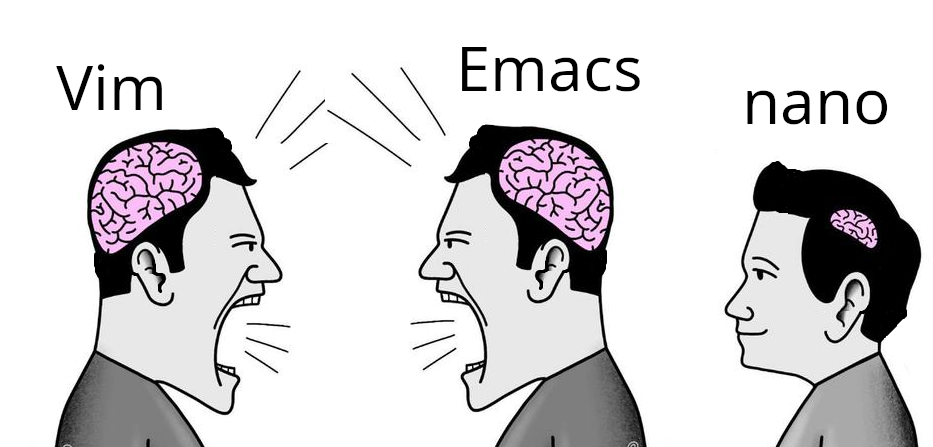
me like use nano. nano say how do thing. nano exit easy.
My computer my choice
I use Nano with the CUA keybindings because screw it, modal editors are too slow for me
ed
Brain size for neovim???
the templates for memes are free on the internet.
I have over 83 templates.
Honestly nano is perfect for quick edits. Vim and Emacs are powerful, but sometimes you just want to open a config file, change one line, and exit without fighting the editor. 😄
This is what i use vim for. Vim doesn’t necessarily have to be a full blown ide with 30 plugins
Vim does not just work if you don’t know how to get into edit mode and save and quit from there. Nano even has built in search and replace.
Funny story, when i first got into linux (almost a decade ago), I accidentally opened nano pasting some random command off the internet and didn’t know how to close it because I didn’t know what the ^ symbol meant.
I had successfully been quiting (and using) vim for a few months at this point.
Linux text editor discourse has been baffling to me for decades now. I don’t care which you use, and I care even less about why.
VS Code is probably the editor that’s easiest to exit. If I ran it on the computer I first ran Emacs on, it’d exit immediately, because VS Code requires a modern version of Windows and that computer had Windows 3.11. If I ran it on the first computer I ran Linux on, it’d also exit immediately because the machine would run out of memory. (…it was a 486DX, I don’t remember how much memory it had, but VS Code doesn’t run well if your memory is measured in megabytes)
nano is usually built in. Adding another one is just redundant if all you’re using it for is editing an occasional config file.
Honestly never understood the hate for it. Who cares? Petty, stupid, nerd-wars over little crap like a text editor is the reason average people don’t even consider linux.
I see vim preinstalled more than nano (e.g. in container images). I’ve been trying to convert to micro, though. It has better support for terminal emulators than nano.
I very rarely see people hate nano (except a few comments in this thread), and I always see nano recommended as the text editor when people give advice on doing things in the command line
Emacs evil mode enters the chatnano gang represent😎
I can use Vim, it was the choice for years. But I actually like using nano because it’s what I need and all I need.
I actually prefer micro
Emacs is a table saw, vim is a chainsaw, nano is a scissor. Every problem those 3 solve is a differently sized single sheet of paper.
HAHAHA HAHAHA
announce to the world you know fuck-all about either, lol
I first ran into nano when I gave Gentoo a try. I had to edit a few config files, so I ran vi… no vi. Emacs? No Emacs. Well, shit, what am I supposed to do? So I went back a bit and read more carefully, apparently there was a thing called nano.
So I ran that. Ew. It was a clone of an old DOS editor of all things. What kind of lunatic had ported that? Anyway I managed to do my edits with it, added normal editors to the system and was on my way.
It was also the last time I used it.nano is the perfect editor for people who only use editors in the terminal, once in a while to edit a config file.
I don’t think it’s the perfect editor for anything. They’ll have to use vi sooner or later, they might as well learn the basics. Or just use kate.
I’ve been using linux for 25 years and I can count the number of times I used vi to actually edit something on one hand. They will not “have to use vi sooner or later.”
It’s OK not to like and not use nano. It’s also OK to like and use nano.
Use Kate in command line over ssh?
Ssh - X
Then run kate, easy :)
“I hated using it”
“But you have used it, yes?”Well, yes. But I did wash my hands afterwards.
Do they have a sink in eMacs now?
Fortunately, every computer comes equipped with an “exit editor” button. It’s on the back, attached to the power supply unit. You just flick the switch. Exits every editor known to humanity. /j
Ah, the famous NCIS way of exiting editors.
Thanks, I hate it!
I no understand nano. I hate key combinations
Vim users: “I feel bad for you”
Nano users: “I don’t think about you at all”
OP suggests otherwise.
Nano users :
Me no think
Nano users have more important things to think about, saying this as an nvim user
yeah, like where the “any” key is on their keyboard
I think it’s more likely the opposite.